
Product guides · For your team · §02 · Orientation
The parts of your workspace
Everything lives behind the icon rail on the left. Here's the actual Portal, then the three areas you'll spend the most time in.
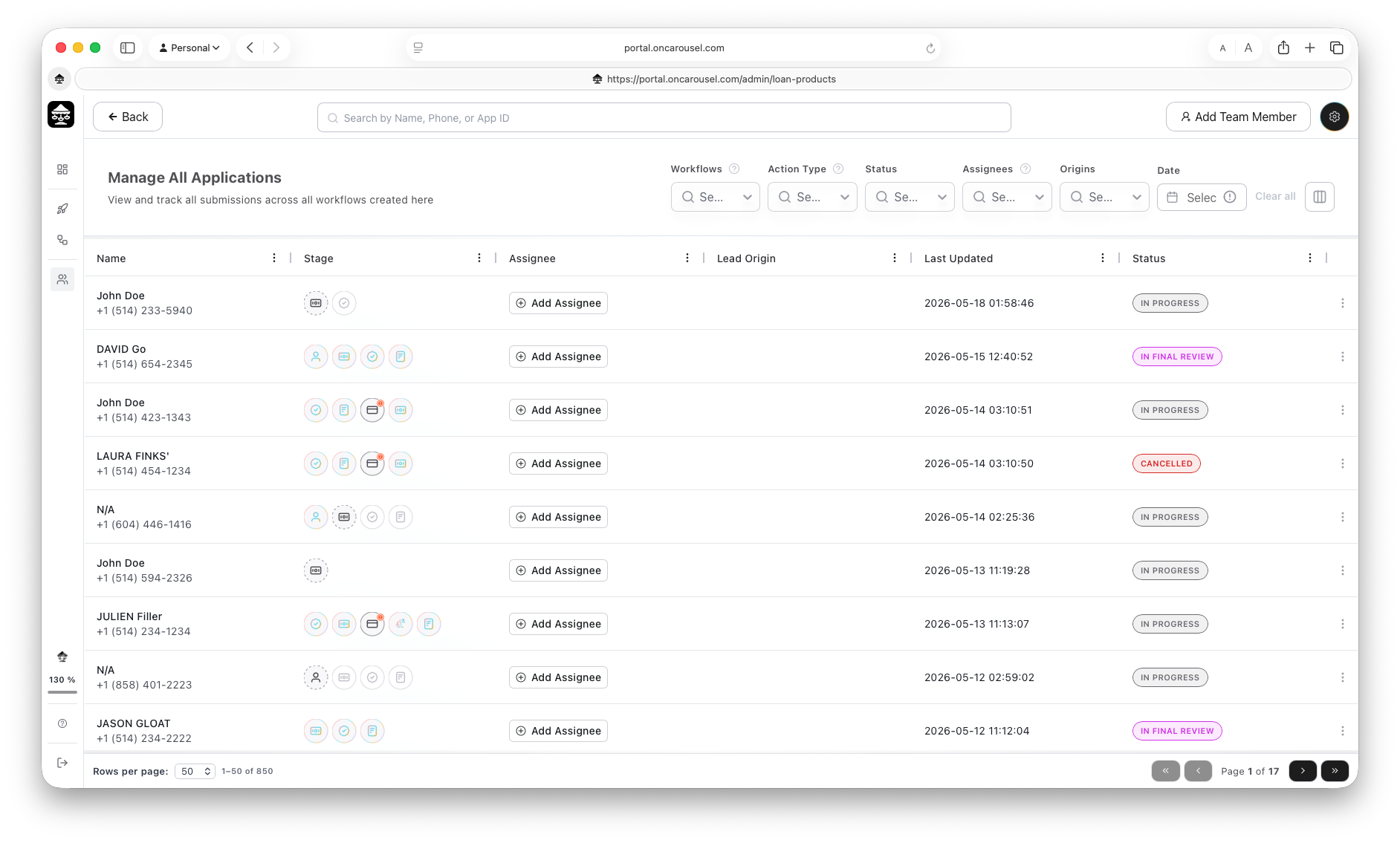
Carousel Portal The live Manage All Applications screen.
What you're looking at
Left rail
Switches between areas — Dashboard, Workflows, Applications, and developer settings.
Search
Top bar, centered — jump to any application by name, phone, or App ID.
Add Team Member
Top-right — invite a teammate (§08).
Filters & columns
Top-right of the list — narrow the results and choose which columns show.
Stage & Status
Table columns — how far each applicant has moved, and the overall state of the file (§09).
The three areas you'll use most
Workflows
See & share workflows
Every workflow you've built, with its status — and the buttons to share or preview it.
Go to §03 →Applications
See your submissions
Every application that comes in across all workflows — your team's shared queue.
Go to §05 →Review
Open & export
Open a submission to review each step and export the result as a PDF.
Go to §06 →